Archiving & Logging. Search for Messages and File Transfers
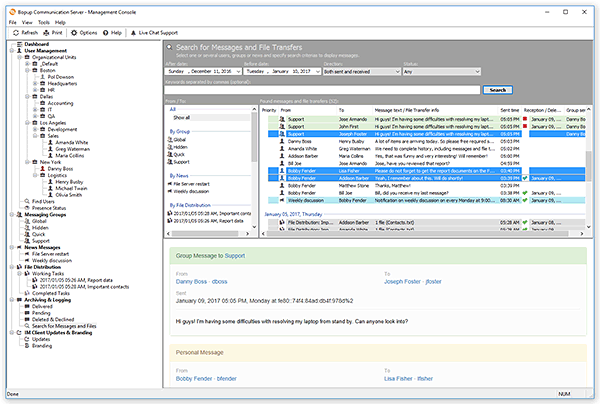
To find messages and file transfers by specific criteria switch to the Search for Messages and File Transfers view from the Archiving & Logging view in the tree. You can also switch to this view from the Welcome Page, just click the Search for messages and file transfers link.
 |
| Search archive for messages and documents |
The search view offers a flexible and powerful functionality to find messages and file transfers by specific criterias. Use the following controls to find the data:
- From / To — This list shows existing objects on the communication server which are grouped by Messaging Groups, News Messages, File Distribution tasks and User Accounts. You can select multiple items from this list by pressing and holding Ctrl key to include messages and file transfers for that items to result.
- After date — Enter the date from which you want to display messages and transfers.
- Before date — Enter the date by which you want to limit displayed messages and transfers.
- Direction — Direction of messages and file transfers. You can choose from "Both outgoging and incoming", "Only outgoing", "Only incoming and to be received" and "Conversation mode" values. These values have an effect if you choose users from the From / To list. The "Conversation mode" means that the result list will contain only messages sent between selected recipients in the From / To list.
- Status — Specify a status of searching data. It can be "Delivered", "Pending", "Deleted & Declined" or "Any" that means that data with all statuses above will be included to a search result.
- Keywords — Keywords separated by commas to search for a specific text in messages. This field is optional and can be left blank to show all messages by criteria above.
Press Search button or just hit Enter key to start searching data. The result view displays the list of found messages and file transfers. Each message is highlighted in a different color according to its type: Personal messages are default color (usually white), group messages — in green, news messages — in blue, and file transfers are highlighted in gray.
Click a message or file transfer in the list to display it in the Preview pane at the bottom of the result view. Press and hold down the Ctrl key to select multiple messages/file transfers from the list.
To save the selected messages and file transfers currently displayed in the Preview pane, select File\Save As... from the main menu. Browse or type a name of the text file to which the save messages.
To print the selected messages and file transfers currently displayed in the Preview pane, select File\Print... from the main menu.



 Facebook page
 Follow Us on Twitter
 YouTube channel
 Read Our News and Blog