Receiving messages ("Classic Messenger" interface mode)
All received messages are automatically displayed on the Today's Messages tab in the the main window of the program. Incoming message is highlighted with a different color that based on a message type.
To view received message, click Messages tab in the main window. The tab provides it's own toolbar to navigate between messages:
From the left to the right:
- Forward current message
Forward currently displayed message to others. This opens a new sending message dialog box with a text of message you received. You will have only to select one or several recipients to forward the message to.
- Pass on to previous message
This displays a previous message you received
- Pass on to next message
This displays a next message you received
- Delete current message
This deletes currently displayed message from messages list.
- Pin message
Mark current message as a pinned message or removes the message from pinned messages list.
You can use keyboard shortcuts (hotkeys) for many of the tasks you perform in Bopup Messenger to help increase your efficiency.
To pass on to previous or next messages you can use  Previous and
  Next buttons on the toolbar or use Ctrl+P and Ctrl+N hotkeys. To delete message use
  Delete button or the same key on the keyboard. In order to delete all messages you received press Shift+Delete keys.
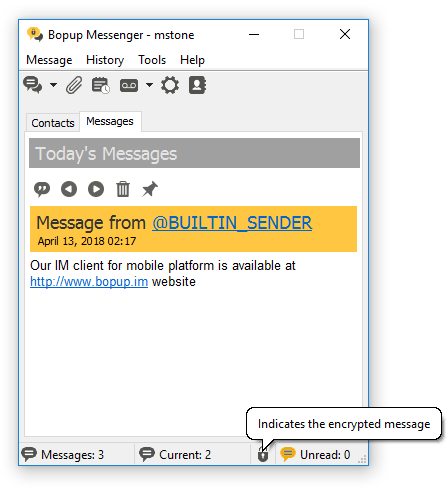 |
| How incomimg message is displayed in the main window |
A number of received messages, index of current message and number of the new (unread) messages are displayed in the status bar of the main window. Bopup Messenger blinks icon in system tray area when a new message comes. You can also set up a sound file on receiving.
In order to view a new message you can open a conversation dialog for the sender. To open a new sending session dialog box switch to the My Contacts tab in the main window, then select recipient from your contacts and click  New button on the toolbar, use Ctrl+S hotkey or double-click on recipient name in the Contact List.
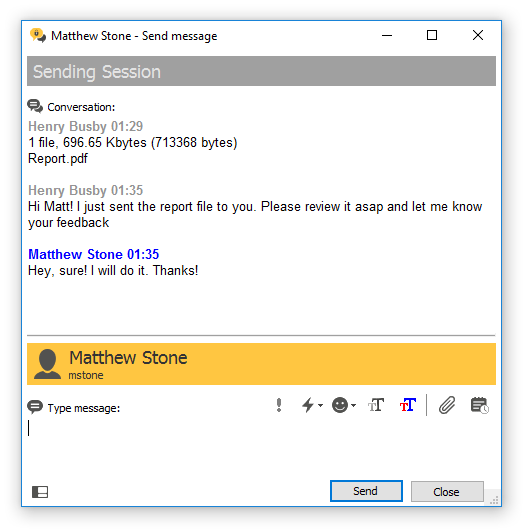 |
| Conversation dialog with a user |
New message is automatically displayed in opened conversation. In cases when there is no opened conversation dialog with the sender, or it is closed (minimized) or another recipient is currently selected in the contacts then Bopup Messenger starts to blink it's icon in system tray area  and also an icon near the sender name on the My Contacts tab.
According to receiving messages settings the messenger plays a sound file, restores (pops up) the sending dialog, etc. on receipt of a new message. Those options are separate for personal (private) and group/news messages.
Sealed messages
Bopup Messenger supports sealed messages feature that means instant messages which must be opened (unsealed) before reading them. Once a sealed message arrives the messenger hides current conversation and shows notification button with a date and/or time of the received message. User has to click the notification to read the message and show conversation again.
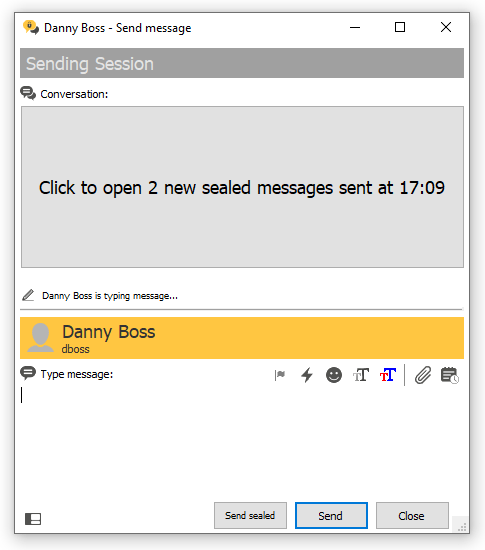 |
| Opening an incoming sealed message |
Once a sealed message is opened it is marked in conversation with "> Unsealed on [date-time]" title shown after date/time of the message. An initial sender of the sealed message also gets a response on unsealing message.
The sealed messaging offers more secure and confidential communication to prevent seeing and reading private messages by someone who may stay close to a recipient's computer.
 |
The ability to exchange with sealed messages depends on appropriate functionality that is enabled on the communication server. |
Offline messages
When you receive an offline message, i.e. a message that sent to you when you were offline and not availble on IM network, it is displayed with the following prefix:
"[This message was stored and forwarded to you by Bopup Communication Server. The message was actually sent at {Month Day, Year HH:MM}]"
where the {Month Day, Year HH:MM} is a date and time when the message was sent.






 Facebook page
 Follow Us on Twitter
 YouTube channel
 Read Our News and Blog